Chapter 2: BGP Path Manipulation with Weight and Local Preference Path Attributes
Objective
This lab focuses on manipulating BGP path selection using the Weight and Local Preference attributes to influence outbound traffic flow. Participants will learn how BGP selects the best path based on different attributes and how to modify them to achieve desired routing behavior.
Key Features Implemented
- eBGP and iBGP session establishment
- Full-mesh iBGP setup within autonomous systems (AS100 and AS200)
- Configuring BGP Weight and Local Preference to influence outbound traffic
Topology
The lab utilizes a multi-AS BGP topology with ISPs and Enterprise networks, as depicted below. Enterprise-C (AS300) advertises prefixes, and Enterprises A (AS100) and B (AS200) use path attributes to influence how they reach these prefixes via ISP-1 (AS1) and ISP-2 (AS2).
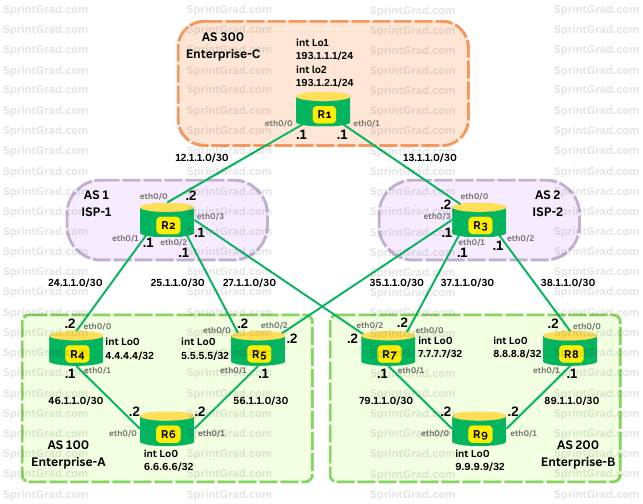
Configuration Tasks
Step 1: IP Addressing and IGP Configuration
- Assign IP addresses as shown in the topology and detailed in the base configurations.
- Configure OSPF (Area 0) within AS100 (R4, R5, R6) for internal routing using appropriate OSPF process IDs (4 for R4, 5 for R5, 6 for R6).
- Configure OSPF (Area 0) within AS200 (R7, R8, R9) for internal routing using appropriate OSPF process IDs (7 for R7, 8 for R8, 9 for R9).
- Ensure Loopback0 interfaces (
4.4.4.4/32,5.5.5.5/32,6.6.6.6/32in AS100;7.7.7.7/32,8.8.8.8/32,9.9.9.9/32in AS200) are advertised via OSPF within their respective AS.
Step 2: Establishing BGP Sessions and Injecting Routes into BGP
- Configure eBGP sessions:
- R1 (AS300) with R2 (AS1, neighbor
12.1.1.2) and R3 (AS2, neighbor13.1.1.2). - R2 (AS1) with R1 (AS300, neighbor
12.1.1.1), R4 (AS100, neighbor24.1.1.2), R5 (AS100, neighbor25.1.1.2), and R7 (AS200, neighbor27.1.1.2). - R3 (AS2) with R1 (AS300, neighbor
13.1.1.1), R5 (AS100, neighbor35.1.1.2), R7 (AS200, neighbor37.1.1.2), and R8 (AS200, neighbor38.1.1.2). - R4 (AS100) with R2 (AS1, neighbor
24.1.1.1). - R5 (AS100) with R2 (AS1, neighbor
25.1.1.1) and R3 (AS2, neighbor35.1.1.1). - R7 (AS200) with R2 (AS1, neighbor
27.1.1.1) and R3 (AS2, neighbor37.1.1.1). - R8 (AS200) with R3 (AS2, neighbor
38.1.1.1).
- R1 (AS300) with R2 (AS1, neighbor
- Configure iBGP Full Mesh:
- AS100: R4, R5, and R6 must have full-mesh iBGP sessions using Loopback0 addresses. Remember to use
update-source Loopback0andnext-hop-selfwhere appropriate (e.g., R4 to R5, R4 to R6; R5 to R4, R5 to R6; R6 to R4, R6 to R5). - AS200: R7, R8, and R9 must have full-mesh iBGP sessions using Loopback0 addresses. Remember to use
update-source Loopback0andnext-hop-selfwhere appropriate.
- AS100: R4, R5, and R6 must have full-mesh iBGP sessions using Loopback0 addresses. Remember to use
- Inject Routes:
- On R1 (AS300), inject
193.1.1.0/24(Loopback1) and193.1.2.0/24(Loopback2) prefixes into BGP usingnetworkcommands.
- On R1 (AS300), inject
Step 3: Adjusting Weight to Influence Path Selection within AS 100
- In AS 100:
- Configure R4 to prefer ISP-1 (path via R2, neighbor
24.1.1.1) for reaching the193.1.1.0/24network by applying a route-map to set a higher weight (e.g., 200) for this prefix received from R2. - Configure R5 to prefer ISP-2 (path via R3, neighbor
35.1.1.1) for reaching the193.1.2.0/24network by applying a route-map to set a higher weight (e.g., 200) for this prefix received from R3.
- Configure R4 to prefer ISP-1 (path via R2, neighbor
Step 4: Adjusting Local Preference to Influence Path Selection within AS 200
- In AS 200:
- Configure R7 to prefer ISP-1 (path via R2, neighbor
27.1.1.1) for reaching the193.1.1.0/24network by applying a route-map to set a higher local preference (e.g., 200) for this prefix received from R2. - Configure R8 to prefer ISP-2 (path via R3, neighbor
38.1.1.1) for reaching the193.1.2.0/24network by applying a route-map to set a higher local preference (e.g., 200) for this prefix received from R3.
- Configure R7 to prefer ISP-1 (path via R2, neighbor
Base Configurations
Ready to get started? Here, you'll find the initial configurations for each device to begin this lab.hostname R1
interface Loopback1
ip address 193.1.1.1 255.255.255.0
interface Loopback2
ip address 193.1.2.1 255.255.255.0
interface Ethernet0/0
ip address 12.1.1.1 255.255.255.252
no shutdown
interface Ethernet0/1
ip address 13.1.1.1 255.255.255.252
no shutdownhostname R2
interface Ethernet0/0
ip address 12.1.1.2 255.255.255.252
no shutdown
interface Ethernet0/1
ip address 24.1.1.1 255.255.255.252
no shutdown
interface Ethernet0/2
ip address 25.1.1.1 255.255.255.252
no shutdown
interface Ethernet0/3
ip address 27.1.1.1 255.255.255.252
no shutdownhostname R3
interface Ethernet0/0
ip address 13.1.1.2 255.255.255.252
no shutdown
interface Ethernet0/1
ip address 37.1.1.1 255.255.255.252
no shutdown
interface Ethernet0/2
ip address 38.1.1.1 255.255.255.252
no shutdown
interface Ethernet0/3
ip address 35.1.1.1 255.255.255.252
no shutdownhostname R4
interface Loopback0
ip address 4.4.4.4 255.255.255.255
ip ospf 4 area 0
interface Ethernet0/0
ip address 24.1.1.2 255.255.255.252
no shutdown
interface Ethernet0/1
ip address 46.1.1.1 255.255.255.252
ip ospf 4 area 0
no shutdown
router ospf 4hostname R5
interface Loopback0
ip address 5.5.5.5 255.255.255.255
ip ospf 5 area 0
interface Ethernet0/0
ip address 25.1.1.2 255.255.255.252
no shutdown
interface Ethernet0/1
ip address 56.1.1.1 255.255.255.252
ip ospf 5 area 0
no shutdown
interface Ethernet0/2
ip address 35.1.1.2 255.255.255.252
no shutdown
router ospf 5hostname R6
interface Loopback0
ip address 6.6.6.6 255.255.255.255
ip ospf 6 area 0
interface Ethernet0/0
ip address 46.1.1.2 255.255.255.252
ip ospf 6 area 0
no shutdown
interface Ethernet0/1
ip address 56.1.1.2 255.255.255.252
ip ospf 6 area 0
no shutdown
router ospf 6hostname R7
interface Loopback0
ip address 7.7.7.7 255.255.255.255
ip ospf 7 area 0
interface Ethernet0/0
ip address 37.1.1.2 255.255.255.252
no shutdown
interface Ethernet0/1
ip address 79.1.1.1 255.255.255.252
ip ospf 7 area 0
duplex auto
interface Ethernet0/2
ip address 27.1.1.2 255.255.255.252
duplex auto
router ospf 7hostname R8
interface Loopback0
ip address 8.8.8.8 255.255.255.255
ip ospf 8 area 0
interface Ethernet0/0
ip address 38.1.1.2 255.255.255.252
duplex auto
interface Ethernet0/1
ip address 89.1.1.1 255.255.255.252
ip ospf 8 area 0
duplex auto
router ospf 8hostname R9
interface Loopback0
ip address 9.9.9.9 255.255.255.255
ip ospf 9 area 0
interface Ethernet0/0
ip address 79.1.1.2 255.255.255.252
ip ospf 9 area 0
duplex auto
interface Ethernet0/1
ip address 89.1.1.2 255.255.255.252
ip ospf 9 area 0
duplex auto
router ospf 9Verification Commands
show ip bgp summary- Check BGP neighbor relationships.
show ip bgp- Check BGP best path selection (observe AS_PATH, Weight, Local Preference).
show ip bgp 193.1.1.0/24(and193.1.2.0/24)- Detailed route view to verify Weight and Local Preference attribute influence on routers in AS100 and AS200.
show ip route 193.1.1.0/24(and193.1.2.0/24)- Check Routing Table to verify which paths are preferred and installed.
Expected Outcomes
- Entire AS100 to prefer ISP-1 (path via R2/R4) for
193.1.1.0/24due to Weight manipulation on R4. - Entire AS100 to prefer ISP-2 (path via R3/R5) for
193.1.2.0/24due to Weight manipulation on R5. - Entire AS200 to prefer ISP-1 (path via R2/R7) for
193.1.1.0/24due to Local Preference manipulation on R7. - Entire AS200 to prefer ISP-2 (path via R3/R8) for
193.1.2.0/24due to Local Preference manipulation on R8. - The routing table reflects the expected best paths based on configured attributes.
- All BGP sessions are established and stable.
Final Configurations
Want to take a look for yourself? Here, you will find the final configurations of each device required for this lab.hostname R1
interface Loopback1
ip address 193.1.1.1 255.255.255.0
interface Loopback2
ip address 193.1.2.1 255.255.255.0
interface Ethernet0/0
ip address 12.1.1.1 255.255.255.252
no shutdown
interface Ethernet0/1
ip address 13.1.1.1 255.255.255.252
no shutdown
router bgp 300
network 193.1.1.0
network 193.1.2.0
neighbor 12.1.1.2 remote-as 1
neighbor 13.1.1.2 remote-as 2hostname R2
interface Ethernet0/0
ip address 12.1.1.2 255.255.255.252
no shutdown
interface Ethernet0/1
ip address 24.1.1.1 255.255.255.252
no shutdown
interface Ethernet0/2
ip address 25.1.1.1 255.255.255.252
no shutdown
interface Ethernet0/3
ip address 27.1.1.1 255.255.255.252
no shutdown
router bgp 1
neighbor 12.1.1.1 remote-as 300
neighbor 24.1.1.2 remote-as 100
neighbor 25.1.1.2 remote-as 100
neighbor 27.1.1.2 remote-as 200hostname R3
interface Ethernet0/0
ip address 13.1.1.2 255.255.255.252
no shutdown
interface Ethernet0/1
ip address 37.1.1.1 255.255.255.252
no shutdown
interface Ethernet0/2
ip address 38.1.1.1 255.255.255.252
no shutdown
interface Ethernet0/3
ip address 35.1.1.1 255.255.255.252
no shutdown
router bgp 2
neighbor 13.1.1.1 remote-as 300
neighbor 35.1.1.2 remote-as 100
neighbor 37.1.1.2 remote-as 200
neighbor 38.1.1.2 remote-as 200hostname R4
interface Loopback0
ip address 4.4.4.4 255.255.255.255
ip ospf 4 area 0
interface Ethernet0/0
ip address 24.1.1.2 255.255.255.252
no shutdown
interface Ethernet0/1
ip address 46.1.1.1 255.255.255.252
ip ospf 4 area 0
no shutdown
router ospf 4
ip prefix-list match-193-1-1-0-net seq 5 permit 193.1.1.0/24
! ip prefix-list match-193-1-2-0-net seq 5 permit 193.1.2.0/24 ! Not used by R4 as per specific task
route-map set-weight-path-attribute-prefer-ISP-1 permit 10
match ip address prefix-list match-193-1-1-0-net
set weight 200
route-map set-weight-path-attribute-prefer-ISP-1 permit 20
! route-map set-weight-path-attribute-prefer-ISP-2 permit 10 ! Not used by R4
! match ip address prefix-list match-193-1-2-0-net
! set weight 200
! route-map set-weight-path-attribute-prefer-ISP-2 permit 20
router bgp 100
neighbor 5.5.5.5 remote-as 100
neighbor 5.5.5.5 update-source Loopback0
neighbor 5.5.5.5 next-hop-self
! neighbor 5.5.5.5 route-map set-weight-path-attribute-prefer-ISP-2 in ! Route-map applied to eBGP neighbor
neighbor 6.6.6.6 remote-as 100
neighbor 6.6.6.6 update-source Loopback0
neighbor 6.6.6.6 next-hop-self
neighbor 24.1.1.1 remote-as 1
neighbor 24.1.1.1 route-map set-weight-path-attribute-prefer-ISP-1 inhostname R5
interface Loopback0
ip address 5.5.5.5 255.255.255.255
ip ospf 5 area 0
interface Ethernet0/0
ip address 25.1.1.2 255.255.255.252
no shutdown
interface Ethernet0/1
ip address 56.1.1.1 255.255.255.252
ip ospf 5 area 0
no shutdown
interface Ethernet0/2
ip address 35.1.1.2 255.255.255.252
no shutdown
router ospf 5
! ip prefix-list match-193-1-1-0-net seq 5 permit 193.1.1.0/24 ! Not used by R5 as per specific task
ip prefix-list match-193-1-2-0-net seq 5 permit 193.1.2.0/24
! route-map set-weight-path-attribute-prefer-ISP-1 permit 10 ! Not used by R5
! match ip address prefix-list match-193-1-1-0-net
! set weight 200
! route-map set-weight-path-attribute-prefer-ISP-1 permit 20
route-map set-weight-path-attribute-prefer-ISP-2 permit 10
match ip address prefix-list match-193-1-2-0-net
set weight 200
route-map set-weight-path-attribute-prefer-ISP-2 permit 20
router bgp 100
neighbor 4.4.4.4 remote-as 100
neighbor 4.4.4.4 update-source Loopback0
neighbor 4.4.4.4 next-hop-self
! neighbor 4.4.4.4 route-map set-weight-path-attribute-prefer-ISP-1 in ! Route-map applied to eBGP neighbor
neighbor 6.6.6.6 remote-as 100
neighbor 6.6.6.6 update-source Loopback0
neighbor 6.6.6.6 next-hop-self
neighbor 25.1.1.1 remote-as 1
neighbor 35.1.1.1 remote-as 2
neighbor 35.1.1.1 route-map set-weight-path-attribute-prefer-ISP-2 inhostname R6
interface Loopback0
ip address 6.6.6.6 255.255.255.255
ip ospf 6 area 0
interface Ethernet0/0
ip address 46.1.1.2 255.255.255.252
ip ospf 6 area 0
no shutdown
interface Ethernet0/1
ip address 56.1.1.2 255.255.255.252
ip ospf 6 area 0
no shutdown
router ospf 6
router bgp 100
neighbor 4.4.4.4 remote-as 100
neighbor 4.4.4.4 update-source Loopback0
neighbor 5.5.5.5 remote-as 100
neighbor 5.5.5.5 update-source Loopback0hostname R7
interface Loopback0
ip address 7.7.7.7 255.255.255.255
ip ospf 7 area 0
interface Ethernet0/0
ip address 37.1.1.2 255.255.255.252
no shutdown
interface Ethernet0/1
ip address 79.1.1.1 255.255.255.252
ip ospf 7 area 0
duplex auto
interface Ethernet0/2
ip address 27.1.1.2 255.255.255.252
duplex auto
router ospf 7
ip prefix-list match-193-1-1-0-net seq 5 permit 193.1.1.0/24
route-map set-LP-path-attribute-prefer-ISP-1 permit 10
match ip address prefix-list match-193-1-1-0-net
set local-preference 200
route-map set-LP-path-attribute-prefer-ISP-1 permit 20
router bgp 200
neighbor 8.8.8.8 remote-as 200
neighbor 8.8.8.8 update-source Loopback0
neighbor 8.8.8.8 next-hop-self
neighbor 9.9.9.9 remote-as 200
neighbor 9.9.9.9 update-source Loopback0
neighbor 9.9.9.9 next-hop-self
neighbor 27.1.1.1 remote-as 1
neighbor 27.1.1.1 route-map set-LP-path-attribute-prefer-ISP-1 in
neighbor 37.1.1.1 remote-as 2hostname R8
interface Loopback0
ip address 8.8.8.8 255.255.255.255
ip ospf 8 area 0
interface Ethernet0/0
ip address 38.1.1.2 255.255.255.252
duplex auto
interface Ethernet0/1
ip address 89.1.1.1 255.255.255.252
ip ospf 8 area 0
duplex auto
router ospf 8
ip prefix-list match-193-1-2-0-net seq 5 permit 193.1.2.0/24
route-map set-LP-path-attribute-prefer-ISP-2 permit 10
match ip address prefix-list match-193-1-2-0-net
set local-preference 200
route-map set-LP-path-attribute-prefer-ISP-2 permit 20
router bgp 200
neighbor 7.7.7.7 remote-as 200
neighbor 7.7.7.7 update-source Loopback0
neighbor 7.7.7.7 next-hop-self
neighbor 9.9.9.9 remote-as 200
neighbor 9.9.9.9 update-source Loopback0
neighbor 9.9.9.9 next-hop-self
neighbor 38.1.1.1 remote-as 2
neighbor 38.1.1.1 route-map set-LP-path-attribute-prefer-ISP-2 inhostname R9
interface Loopback0
ip address 9.9.9.9 255.255.255.255
ip ospf 9 area 0
interface Ethernet0/0
ip address 79.1.1.2 255.255.255.252
ip ospf 9 area 0
duplex auto
interface Ethernet0/1
ip address 89.1.1.2 255.255.255.252
ip ospf 9 area 0
duplex auto
router ospf 9
router bgp 200
neighbor 7.7.7.7 remote-as 200
neighbor 7.7.7.7 update-source Loopback0
neighbor 8.8.8.8 remote-as 200
neighbor 8.8.8.8 update-source Loopback0
neighbor 8.8.8.8 next-hop-self